Quick document library
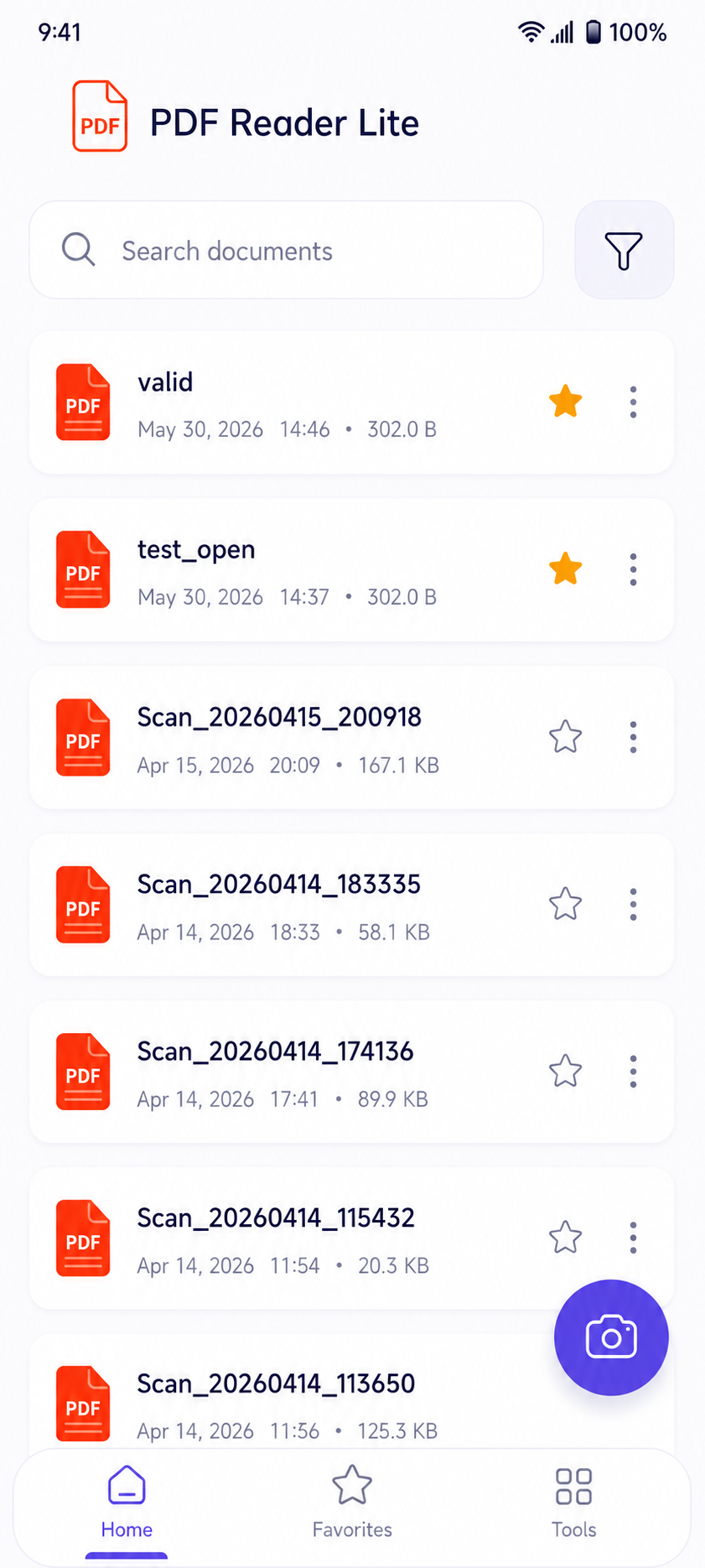
Search, filter, favorite, and reopen recent PDFs from a clean home screen.
Lightweight Android PDF app
Open, read, mark, sign, and share PDF files with a clean mobile workflow built for speed.
Core workflow
PDF Reader Lite keeps the interface focused on frequent document tasks instead of burying them under heavy menus.
Search, filter, favorite, and reopen recent PDFs from a clean home screen.
Move through long files with page position, zoom, reading mode, orientation, and share actions.
Highlight text, add notes, underline, strike out, write with pen tools, and adjust opacity.
Scan, merge, split, compress, lock, unlock, convert images, and print documents.
Product screens
Home
Recent documents, favorites, search, and filtering are visible right away, so users can get back to the file they need.
Lightweight by design
Open reports, invoices, scans, notes, and downloaded documents in seconds.
Use page controls, zoom, search, and reading mode to move through longer files.
Capture decisions with highlight, pen, underline, strikethrough, note, and signature tools.
Share or export documents when the review is finished.
Download
Install the Android app for a fast, simple PDF workflow that fits reading, reviewing, and sharing into one lightweight tool.
Contact
Email the support address and include your device model, Android version, and a short description of the issue.